
In about a week, a Claude Code agent and one human built a complete Home Assistant smart home: Zigbee and Z-Wave radios, a camera recorder with local AI detection, a voice assistant in English and Polish, Google Home control, circadian lighting, layered backups and a weekly health report the agent writes itself. The agent researched, configured, drove the APIs and chased the bugs. The human paired every bulb, did the logins and made every decision that mattered.
This is the field log, with a plain-English note after each nerdy bit. Some details are deliberately vague: this is a real home, so device counts, rooms, camera placement and anything useful to a stranger stay out.
What the house runs
The build started on a Mac mini-class desktop with 16 GB of memory, everything in Docker Desktop. The rule was “Docker Compose now, Proxmox later”: the same Compose files could move to small-form-factor PCs by copying a folder and flipping a few settings. Home Assistant OS in a VM was rejected for giving less control, so Home Assistant runs as a plain container with no add-ons, a choice that shaped much of what followed.
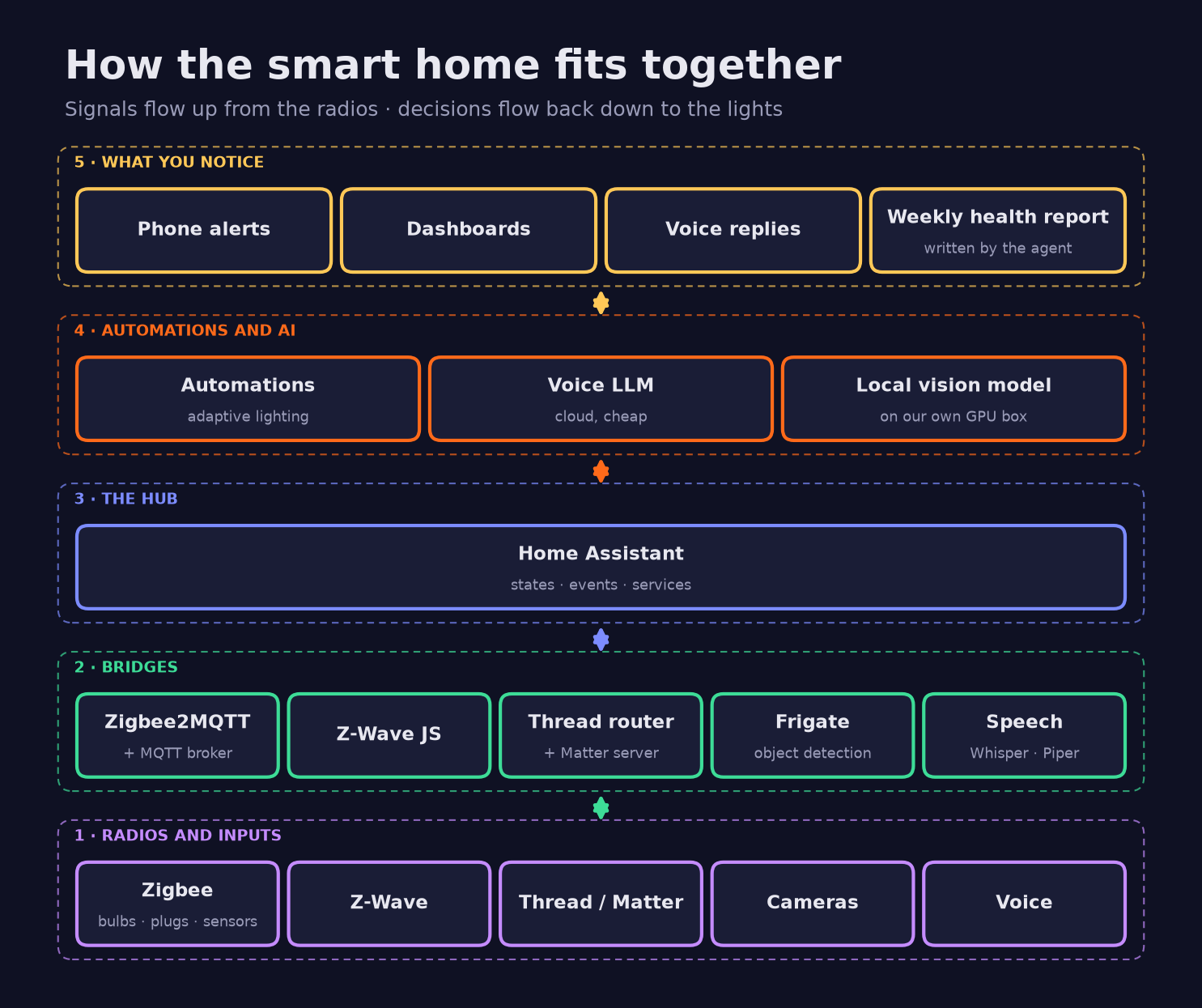
| Layer | Component | Job |
|---|---|---|
| Radios | Zigbee2MQTT and a coordinator stick | Bulbs, plugs, sensors, controllers |
| Radios | Z-Wave JS UI and a Z-Wave stick | Z-Wave devices, S2 security, controller backups |
| Radios | Thread border router, Matter server | Matter-over-Thread devices (after the Proxmox move) |
| Message bus | Mosquitto (MQTT) | Zigbee state and commands to and from the hub |
| Hub | Home Assistant | Devices, areas, automations, dashboards, phone app |
| Cameras | Frigate | Object detection, event recording, push alerts |
| Local AI | Vision model on our DGX Spark | Describes event snapshots, no cloud |
| Voice | Whisper, Piper, a cloud LLM | A bilingual assistant, mostly local |
| Add-ons | HACS: Adaptive Lighting, Watchman, Battery Notes | Circadian light, config checks, batteries |
How the work was split between agent and human
| Area | The agent | The human |
|---|---|---|
| Research | Parallel research agents against official docs and source repos; a benchmark of 10 LLMs | Chose between options |
| Code | Compose stacks, deploy and bridge scripts, YAML automation packages, dashboard builders, the report collector | Ran the first bridge and deploy commands |
| Setup | Integrations through the Home Assistant API, Z-Wave JS UI, camera stream settings over HTTP APIs, the Google console via a browser extension | Owner onboarding, HACS device-code approval, Google sign-in, vendor app toggles, an email app password |
| Devices | Made an unknown bulb blink so it could be found | Reset and paired every device, walk-tested sensors |
| Decisions | Proposed options, logged each with its reason | Maintained add-ons over custom code, the official Google Home integration, two-second fades |
| Paperwork | A timeline entry per change, a decisions log, an eight-page bilingual voice guide | Read and corrected it |
Day one: research, then code, then review
Before any config was written, three research agents ran in parallel on voice, Google Home and Frigate on Docker, checking config keys and prices against official docs and source code. The agent also audited the old CCTV software and recommended Frigate: the old software was Windows-only and out of licensed updates, while Frigate is built for containers, integrates natively with Home Assistant and keeps its config in Git.
The stack followed: Compose files for Home Assistant, Mosquitto, Zigbee2MQTT, Z-Wave JS UI, Wyoming Whisper and Piper, and Frigate, plus a deploy script that generates its own MQTT, restream and Zigbee keys. An independent review found 9 defects. Home Assistant’s camera streams returned 401, because Frigate’s bundled restreamer, go2rtc, skips authentication only for loopback clients; and non-ASCII URL encoding broke on the old bash macOS ships. All 9 were fixed and re-tested on that shell. The agent had no terminal on the host yet, so the human ran two commands: the bridge found the radio sticks and the deploy brought up seven containers.
The radios: Zigbee, Z-Wave and Thread
Zigbee2MQTT or ZHA
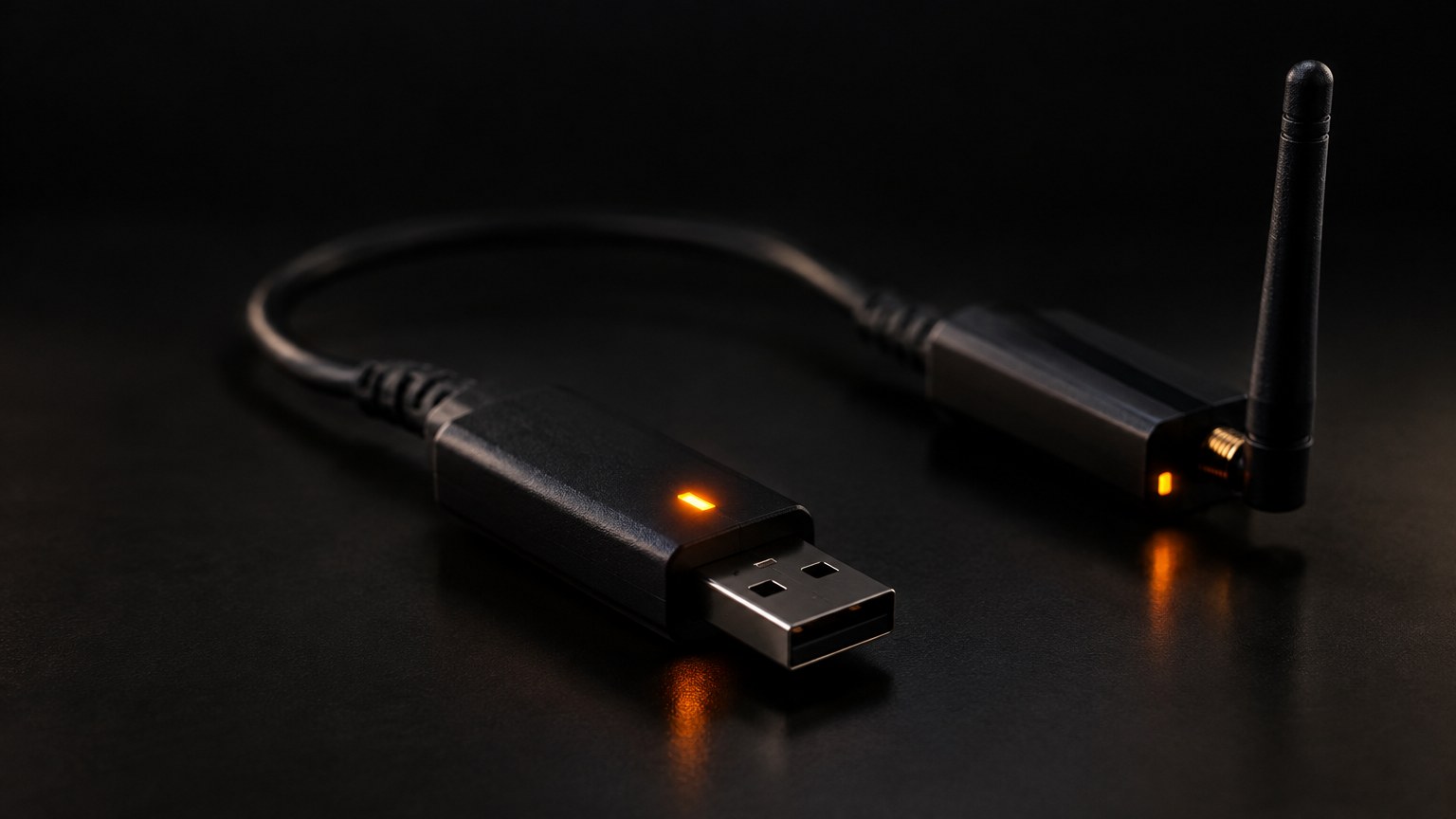
ZHA is Home Assistant’s built-in Zigbee integration and simpler to start with. Zigbee2MQTT runs as its own service and talks MQTT. We picked Zigbee2MQTT:
| Reason | What it bought us |
|---|---|
| IKEA support | The house is mostly IKEA and Hue bulbs |
| OTA updates | Device firmware updates from its interface |
| Zigbee groups | One command per fixture or the whole house, so lights change together |
| Rename API over MQTT | The agent renamed everything in one pass |
| Separate service | The mesh keeps running while Home Assistant restarts |
Coordinator, routers and end devices
Zigbee is a low-power mesh on 2.4 GHz. The coordinator, our USB stick, starts the network and holds its keys. Mains-powered bulbs and plugs are routers that relay traffic. Battery sensors are end devices: they sleep most of the time and attach to a nearby parent router. So turning a bulb off at the wall does two things: the bulb goes unavailable, and any sensor using it as a parent loses its link. Wall switches are the enemy of smart bulbs, so there is now a wall-switch-off alert, and clip-on Zigbee switch controllers are on order. Flipping a wall switch six times resets IKEA bulbs on that circuit, so groups get re-checked afterwards.
Zigbee channels are narrow and 5 MHz apart; a Wi-Fi channel is about 20 MHz wide. We picked a Zigbee channel clear of the house Wi-Fi, since the usual alternatives, 20 and 25, sit on the edges of its band. Older IKEA bulbs stuck on a previous network joined after a Touchlink factory reset from the coordinator and one power cycle.
MQTT and Z-Wave
Mosquitto is the broker. Zigbee2MQTT publishes each device’s state to a topic and listens on another for commands; Home Assistant subscribes and creates entities through MQTT discovery. Z-Wave is a separate mesh on a sub-gigahertz band, away from crowded 2.4 GHz, with S2 security. It runs in Z-Wave JS UI, connected to Home Assistant’s integration over a websocket, which also handles controller NVM backups. The agent set keys and region and turned soft reset off, because older sticks can lock up with it on.
The USB bridge macOS forced on us
Docker Desktop on macOS has no USB passthrough. ser2net on the host exposed each stick as a TCP port on localhost, reached through Docker’s host.docker.internal alias. macOS has no /var/lock, so ser2net needs nouucplock, and because macOS names a serial device after its port, moving a stick meant re-running the bridge. That bridge is now retired: after the move to Proxmox the radios are served over the network from a small box in the cluster, as the lab overview describes.
Thread and Matter: parked, then live
Thread is a low-power IPv6 mesh on the same kind of radio as Zigbee and needs a border router to reach the network. Matter is the device standard that runs over Thread or Wi-Fi, and pairing relies on mDNS discovery. One stick was kept for Thread alone, because sharing one stick between Zigbee and Thread (multiprotocol) is deprecated. A Matter bridge for Google failed at first: phones could not pair with it from Docker Desktop, which lacks host networking and mDNS. On Proxmox it runs with host networking, a border router and Matter server sit beside Home Assistant, and the first Matter-over-Thread devices have joined.
Cameras and local AI with Frigate
Frigate decodes a low-resolution sub-stream, 640×360 at 6 fps, for motion and object detection, and records the main stream only when something is worth keeping. Recording bitrates were cut by 59%. Recordings go to the NAS; Frigate’s SQLite database stays on local disk, because SQLite must never sit on an SMB share.
The rules came from real behaviour. Animals are recorded but never alert. A parked object that never moves creates no event. A stationary object was once read as a “person” for over an hour, so automations now react only to people who are moving. Snapshots are described in words by Qwen2.5-VL-32B on our NVIDIA DGX Spark, so no image leaves the building; Frigate’s chat needed a second, tool-calling model, Qwen3-30B. Phone alerts carry a snapshot and clip, built as a script because notify groups drop images and action buttons, and the package passed 57 runtime checks.
The biggest lesson was memory. When Frigate stalled, the 8 GB Docker VM had about 83 MB free, swap was full and the load average was 80 on 10 CPUs. Turning off Frigate’s 891 MB semantic-search model dropped the load to 1.5. The Mac itself was swapping 21.7 GB, so the real fix was Proxmox, where detection can use the iGPU through OpenVINO. Every Frigate config is now validated inside the container before a restart, because Frigate rejects unknown keys.
Voice in two languages for about $2 a month
Whisper does speech-to-text and Piper text-to-speech, with a British English and a Polish voice. An LLM “brain” runs through OpenRouter, but “prefer handling commands locally” is on, so “turn on the lamp” never reaches it. With one agent, the LLM sometimes answered English in Polish, read out by the English voice. The fix was two pipelines, each with its own language, an English-only or Polish-only agent sharing one prompt body, and its own voice: 4 out of 4 answers in the right language.
Research first suggested Claude Sonnet 5 at about $14 a month. The agent benchmarked 10 tool-calling models on real English and Polish commands; Gemini 2.5 Flash-Lite scored 4/4 at 0.5 s but invented presence and mixed up today’s and tomorrow’s weather. A rewritten prompt (presence only from occupancy sensors, current weather only) and Gemini 3.1 Flash-Lite gave 0 failures in 14 tests. Cost: $0.0024 per question, about $2 a month, with a hard $50 limit on the key. Nest speakers cannot be Assist microphones, because Google blocks third-party AI, so they make announcements.

Lights that behave
The owner’s rule, “always use HACS add-ons” over hand-built code, is why Adaptive Lighting replaced two custom light curves. IKEA bulbs ignore transitions on plain on and off but fade brightness changes, so motion lights switch on at 1% and fade up over two seconds. The motion lights had four bugs, all fixed:
- A 4 ms race. The bulb’s state was checked before it had reported back, so no countdown started.
- Off mid-walk. The countdown started at “occupancy on”, and continuous movement sends no new state, so lights went off on people still moving. It now starts on “clear”.
- Back on at the wall. A bulb repowered at the wall booted off while the sensor still saw someone; a “light came back” trigger fixed it.
- Sunrise lights. A 1% pre-fade step ran before the darkness check. That bug lived about 9 hours.
Separately, a timezone bug treated sun times in UTC as local time.
Secrets and backups, in general terms
The deploy script generated every key locally into owner-only .env files, so no credential passed through the agent. Later the agent scrubbed plaintext passwords from its own notes and moved the secrets into a self-hosted vault, referenced by name and never printed. Backups are layered: Home Assistant’s own encrypted backups, an off-box copy to a second location and the NAS, and separate backups of the Zigbee coordinator and Z-Wave controller, because a radio network’s keys and pairings live in the stick. Each copy runs with a timeout, and the weekly report checks the copies are fresh at the destination, not just that the job said it succeeded.
A weekly health report written by the agent
A Python collector gathers data over Home Assistant’s REST and WebSocket APIs, MQTT, Docker and the host: log errors, flapping entities, Zigbee link quality, battery trends turned into days left, energy in kWh and euro, swap and disk, backup freshness, Frigate health and a Watchman check for missing entities. It separates restart blips, where 30% or more of entities drop in the same minute, from real dropouts. Claude Code then runs headless (claude -p) in the project folder and writes a Markdown report with fixes, upgrades and suggestions, under two rules: “Don’t invent data” and “No secrets”. If the AI step fails, the raw data is emailed instead.
Report one paid off at once. Watchman raised 50 flags; 2 were real and were fixed. The same work exposed an Adaptive Lighting automation aimed at an entity that did not exist, so one of its modes had never engaged. This is the loop behind software systems that compound: the house gets slightly better each week instead of slowly rotting.
The human in the loop, in practice
When a Claude Code safety classifier blocked the agent from applying a password-free login rule, flagged as weakening security, the change went back to the human to apply personally or approve explicitly. That is the right default: an agent may propose anything, but lowering a security bar is a human’s call. The agent kept an honest record too, re-timing one evening’s timeline entries from the radio logs when it noticed they were 1.5 hours off. Our action tags convention grew out of weeks like this.
What went wrong, and what we learned
- Docker Desktop’s limits. No USB passthrough, host networking or mDNS: Cast devices were added by address, broadcast Wake-on-LAN became unicast, and drifting devices needed router reservations.
- Voice collisions. Google commands matched helper toggles named “motion light” and switched them off. Helpers were renamed.
- Silent failures. A copy job and an automation both looked fine and did nothing. Check outcomes, not exit codes.
Where it stands
Live: the whole house, now on the Proxmox cluster from the lab overview, with networked radios, Thread and Matter, and the weekly report. Next: GPU-accelerated detection. Planned: a pulsing alert light in the workspace. When lab monitoring raises an alert, Home Assistant will make a smart light breathe amber for a warning or red for an error, then restore it once the alert clears; the lab post covers the wiring.
Glossary
- Coordinator: the USB stick that starts a Zigbee network and holds its keys.
- Router and end device: mains devices that relay mesh traffic, and battery devices that rely on a parent.
- MQTT: a lightweight publish-and-subscribe protocol; Mosquitto is the broker.
- Thread and Matter: a low-power IPv6 mesh, and the cross-brand device standard that runs over it.
- HACS: the Home Assistant Community Store.
- Sub-stream: a camera’s second, low-resolution stream, cheap to analyse.
The same method, applied to client systems
The agent researches primary sources, writes the configuration, works through APIs and documents every change. An independent review checks it before anything runs. Credentials stay out of its context. A human owns the hardware, the logins, the approvals and every decision that lowers a security bar. That is how we run automation work at D3X Solutions LABS: a written method statement, explicit approval gates, and a reporting loop that catches silent failures early.
Planning an agent-assisted build? Talk to D3X Solutions LABS about running it with a human in the loop.
FAQ
What is Home Assistant, and do I need a hub for it?
Home Assistant is free software that brings lights, sensors, speakers and cameras from different brands into one app with one set of automations. It runs on a small always-on computer. A USB radio stick replaces the separate hub each brand would otherwise want.
Is Zigbee2MQTT better than ZHA?
Not everywhere. ZHA is built into Home Assistant and simpler to start with. We chose Zigbee2MQTT for IKEA support, firmware updates, groups and a rename API, and because the mesh keeps running while Home Assistant restarts.
Can Claude Code set up Home Assistant on its own?
Not entirely. It researched, wrote the stacks and scripts, added integrations through the API and debugged. A human plugged in hardware, paired every device, did the logins and approvals, and made the decisions.
Does AI object detection for cameras need the cloud?
No. Frigate detects objects locally, and our snapshot descriptions come from a vision model on our own DGX Spark. No image goes to a cloud API.
How much does a bilingual LLM voice assistant cost to run?
We measured $0.0024 per question, about $2 a month at 30 questions a day, with Gemini 3.1 Flash-Lite through OpenRouter. Simple commands never reach the model, and the key has a hard $50 limit.
How do you keep passwords away from an AI coding agent?
Scripts generate keys locally into owner-only files, then a self-hosted password vault holds them. The agent refers to secrets by name and never prints a value.
Want this working in your business?
D3X Solutions LABS builds AI agents and automation that pay back fast. Set up a free 30-minute call and we will map your first win together.
Get in touch







