

Our AI agents do real work around the house and the business: the home lab, the smart home, the NAS, email, a finance app. Each of them sometimes needs a person. A job finished, a decision is waiting, a disk is filling up. For months, “reaching a person” meant a crowd of Telegram bots, pop-ups on a Mac and a public push topic. It worked, roughly, until the agents started talking over each other.
This week we replaced all of it with three things we run ourselves: a Zulip chat server, an ntfy push server and one small relay between them and the agents. Every agent now has its own channel, every task gets its own thread, and the phone only buzzes when a person is actually needed. This is how it fits together, why we chose those two tools, and what pushed us off Telegram.
Why Telegram stopped being enough
Telegram was a good start. Bots are free, the app is on every phone and a forum group with one topic per project looked tidy. Five problems showed up as the number of agents grew:
- One reader per bot. A Telegram bot hands its updates to one program at a time. Two agents can’t share a bot, so every agent got its own, and we ended up with half a dozen bots in one group.
- Privacy mode cuts both ways. A bot only sees all group messages with privacy mode off. When we turned it off for the agent that needed to read replies, we also turned it off for two others. Within the hour, one agent answered a revision note meant for a different one.
- Pop-ups on one machine. Some jobs announced themselves with macOS notifications. Useful at the desk, invisible everywhere else, and gone the moment you dismiss them.
- A public push topic. Infrastructure alerts went to the public ntfy.sh service, where the topic name is effectively the password.
- Someone else’s servers. Every job result, question and approval went through a cloud we don’t control.
None of these is dramatic on its own. Together they meant we couldn’t answer a simple question: what did the agents say to each other, and to us, today?
Three channels, one job each
Before choosing tools we wrote down a rule: every message has exactly one place to go, decided by who it is for. That gives three channels.
| Channel | Who talks | What goes there | Wakes the phone? |
|---|---|---|---|
| Agent bus (MQTT) | Agent ↔ agent | Hand-offs, status, task events between sessions | No |
| Zulip | Agents ↔ us | Job results, questions, decisions, reports | Only when a person is needed |
| ntfy | Systems → us | Hardware and infrastructure alerts | Yes, by priority |
The agents already had a message bus: an MQTT broker where each agent session has an inbox and can send to any other. That stays agent-to-agent. What was missing was a place for people, and a way for the phone to know what matters.
Why Zulip
We looked at the usual self-hosted chats. Zulip won on one feature: topics. Every message in a Zulip channel belongs to a named topic, so a channel reads like an inbox of short threads instead of one endless scroll. That maps exactly onto how agents work.
- One channel per project: #proxmox, #seo, #smart-home, #email, #nas, #banksteer.
- #tasks, with one topic per task, so a request and every reply about it stay together.
- #decisions for anything waiting on a person, #alerts and #reports for the rest.
- #bus, a read-only mirror of every agent-to-agent message. This is the audit log we were missing.
Zulip is open source and every agent can have its own bot account with a clear name. It runs in a container on our Proxmox cluster with its own address and serves HTTPS itself, with a certificate from our own certificate authority. No reverse proxy in front, and nothing exposed to the internet: it is reachable at home and over our private Tailscale network. Zulip’s own push service is switched off too, so no message content leaves the house to wake a phone.
One surprise: the Zulip Android app ignores certificate authorities you install yourself, so it refused to connect to a server signed by our own CA. The browser was fine. Rather than buy a public certificate and expose a name on the internet, we use Zulip as an installed web app in Chrome and let ntfy do the waking up.
Why ntfy
A chat app is only half of it. The other half is the phone in your pocket. Most push notifications on a phone travel through Google’s or Apple’s cloud push service. ntfy is a small open-source push server that apps and scripts publish to with a single HTTP request, and its phone app subscribes to your own server.
On Android the ntfy app keeps its own connection open to our server (“instant delivery” over WebSockets), so a push arrives in about a second without going through Google. Unlike the Zulip app, it accepts our own certificate authority once the root certificate is installed in Android’s settings.
Ours runs in its own small container, HTTPS only, with sign-up off and access set to deny-all: only accounts we create can publish or subscribe. Firebase was never configured, so the server could not use it even by mistake. There are two accounts: an admin for the owner and a write-only publisher for the relay that can post to two topics and nothing else:
| Topic | Who publishes | What it carries |
|---|---|---|
| chat | The relay | Zulip messages that need a person, with a tap-to-open link |
| lab | Monitoring and backups | Hardware, node, storage and backup alerts |
ntfy has five priority levels, and we use them. A message tagged 🟥 (blocking: nothing can continue until a person acts) goes out at the top priority. 🟧 (blocking something important) goes one level lower. Everything else that needs a person, such as a direct message or an @-mention, arrives as a normal notification. Routine reports never push at all.
The relay: five jobs, one small service
Zulip, ntfy and the agent bus don’t know about each other. A single Python service of under 300 lines connects them:
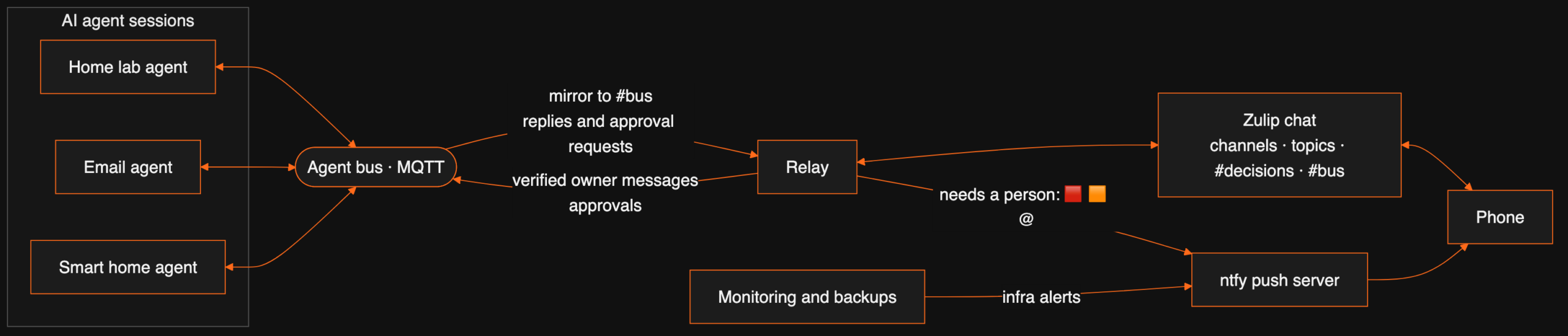
| Job | What happens |
|---|---|
| Zulip → phone | A direct message, an @-mention, or a 🟥 / 🟧 / “needs the owner” tag becomes an ntfy push. Tapping it opens that message. |
| Agent bus → Zulip | Every agent-to-agent message, broadcast and task event is mirrored into #bus, posted as the sending agent’s own bot. |
| Zulip → agent | A message in an agent’s project channel, an @-mention of its bot, or a direct message lands in that agent’s inbox. |
| Agent → Zulip | The agent’s reply is posted as its bot, in the same conversation the person wrote from. |
| Approvals | When an agent wants to run something that needs permission, the request appears in #decisions. A one-line reply approves or refuses it. |
Bots are created the first time an agent appears, so adding an agent needs no chat setup at all. Writing in #seo reaches the agent that owns the website without an @-mention, because each project channel is mapped to its agent. The relay also remembers which conversation each agent was last asked in, so an answer to a question in #tasks comes back to that topic, not to a generic inbox.
Agents that wake up when you write
A chat is only useful if the other side answers. Our agents are Claude Code sessions, and until this week they read their bus inbox only when they happened to check it. A message could sit for an hour.
Claude Code has a research-preview feature called channels: a tool server can push an event straight into a running session. Our bus server now does exactly that. The moment a message lands in an agent’s inbox it appears in that session as a new event, and the agent starts on it. No polling, no timers. Messages that arrive while a session is still starting up are queued and pushed as soon as it connects.
A typical exchange now looks like this. We write one line in the agent’s project channel from the phone. Within seconds the agent has it, does the work and answers in the same thread. If it needs a decision, it posts with a 🟧 tag and the phone buzzes. Every message the agents swapped along the way is readable in #bus.
Approving from the phone
Agents ask before they run anything risky, such as a command that changes a server. Those prompts used to appear only in the terminal window of the machine running the agent, so work stopped until someone sat down at it.
Now the same prompt is forwarded to #decisions, with the tool, a short description, a preview of what will run and a five-letter request code. It carries the 🟧 tag, so the phone buzzes. Replying yes abcde or no abcde sends the answer back to that one agent, and the agent carries on or stops. A code is used once and then forgotten, so an old reply can’t approve a new request.
Who gets to give orders
Once agents read chat messages, the important question is which messages count as instructions. An agent that obeys anything in its inbox can be talked into anything by another agent, or by text pasted from a web page.

Our rule is short. Only one sender counts as a person: the owner. The relay posts as the owner only after Zulip confirms the message was written by the owner’s own account, and it posts on a separate, verified line into each agent. The message broker enforces this: no other account is allowed to publish on that line, and each agent can read only its own inbox. Every message arrives marked verified or not.
The check is not theoretical. During setup, one of our own messages took an older route and arrived marked unverified. The agent treated it as information and waited for a verified one before acting. That is the behaviour we want.
Messages from every other agent are information, never approval. An agent can tell another that a job is done; it can’t tell it to publish, delete or pay for something.
What went wrong on the way
- The privacy-mode mix-up. Covered above: one Telegram setting changed for three bots at once, and an agent answered a note that wasn’t for it. Zulip’s per-bot accounts and per-agent routing remove that class of mistake.
- Pop-ups nobody saw. Desktop notifications looked fine in testing and failed whenever we were away from the desk. They are now banned outright: a result goes to chat, an alert goes to ntfy.
- Too many pushes, at first. The first draft pushed every message. A phone that buzzes for every status line gets muted, and then the one alert that matters is missed. Pushing only direct messages, mentions and the two blocking tags fixed it.
- Messages nobody read. The agents had inboxes, but nothing was listening to them. A message sat until a session happened to check, sometimes for an hour. That is why the push into running sessions exists.
- Anyone could sign as the owner. In the first version, any agent could write “from: owner” on a message. The fix is the separate verified line described above, which only the relay’s account may publish to; anything else claiming to be the owner is labelled unverified.
- Pushes that never arrived. The first version of the push into running sessions did nothing. The tool server answered the newer protocol handshake, and on that handshake the session would not accept channel events. Serving only the older handshake fixed it. A second trap was in the SDK: its default capability list leaves out the experimental channel flags, so the session never registered the server as a channel until we added them ourselves.
- Messages that came too early. Anything that reached an inbox while a session was still starting was silently lost on the push path. The server now holds those and pushes them the moment the session is ready.
- Two chats at once. Telegram is still on while Zulip proves itself. For a while some messages arrive in both. That is deliberate: we switch Telegram off once a few weeks pass without anything going missing.
How we installed it, and the fixes it needed
The whole build, from an empty container to the agents answering in chat, took about two and a half hours one evening. Most of that went on the five fixes below, not on the installs.
- Zulip got its own unprivileged Linux container on the cluster. We used the official server tarball, checked its checksum and ran the standard installer, with Zulip’s push service switched off. The certificate comes from our own CA over ACME and sits where the installer expects it, so Zulip serves HTTPS itself. Afterwards we made it fully local: no Gravatar, no video-call button, no GIF search and no outgoing email.
- ntfy got a second, smaller container. The official package (checksum checked again), native HTTPS with a certificate from the same CA, no plain HTTP listener, deny-all access and sign-up off.
- Channels were created up front: one per project plus #tasks, #decisions, #alerts, #reports and #bus. Renaming later is easy; retraining habits is not.
- The relay went in last, one direction at a time, starting with chat to phone.
| Problem | Cause | Fix |
|---|---|---|
| Zulip installer refused to run | It wants 5 GB of RAM or swap, and our hosts run without swap | A 6 GB memory limit for the container. It is a ceiling, not memory reserved up front |
| Zulip’s database would not start | Newer PostgreSQL uses an I/O mode (io_uring) that needs locked memory, which an unprivileged container doesn’t allow | A small config override switching it to worker-based I/O, placed where Zulip’s own config management won’t overwrite it |
| Services failed to start in both containers | Their systemd sandboxing needs features a plain container blocks | Nesting enabled on both containers |
| ntfy could not use the standard HTTPS port | A non-root service may not bind low ports by default | One kernel setting inside the container lets unprivileged services bind the HTTPS port |
| Zulip’s API rejected the relay’s login | With email visibility restricted, the API wants the account’s real email, not the display address | Use the real account email in the relay’s config |
Words used in this post
| Term | Meaning |
|---|---|
| MQTT | A lightweight messaging protocol: programs publish to named topics and others subscribe. |
| Message bus | A shared channel where programs, here AI agent sessions, send each other messages. |
| Zulip | An open-source team chat where every message belongs to a channel and a named topic. |
| ntfy | An open-source push notification server that sends alerts to phones and desktops over plain HTTP. |
| Relay | A small service that passes messages between systems that don’t know about each other. |
| Certificate authority (CA) | The service that signs HTTPS certificates. Ours runs at home, so our devices trust our own sites. |
The same method, applied to your systems
The pattern here (one channel per job, a clear rule for who can give instructions, and alerts that only fire when a person is needed) is the same one we use when we put AI agents into a business. If your team is drowning in bot notifications, or about to give agents access to real systems, a free 30-minute call is enough to sketch what a calmer setup would look like.
FAQ
Can Zulip be self-hosted for free?
Yes. The Zulip server is open source and you can run it on your own hardware at no licence cost. Paid plans exist for hosted Zulip Cloud and for commercial support.
Does ntfy work without Google Firebase?
The ntfy server works without Firebase. You run it yourself and the phone app subscribes to your server directly. We run ours with Firebase off and access set to deny-all, so only accounts we create can read or publish.
Why not keep using Telegram bots for AI agents?
Telegram works, but each bot allows only one program to read its updates, a bot with privacy mode off reads every message in a group, and everything sits on Telegram’s servers. With several agents in one group, that turns into bots answering messages meant for other bots.
What does the relay between the agents and Zulip do?
It mirrors every agent-to-agent message into one audit channel, turns messages that need a person into phone pushes, carries a person’s replies back to the right agent, and forwards approval requests. It is one small Python service.
Can a Claude Code session react to a chat message without polling?
Yes, with Claude Code’s channels feature, currently a research preview. A tool server pushes each incoming message into the running session as an event, and the session handles it like a message typed to it.
Can I approve an AI agent’s actions from my phone?
In our setup, yes. Approval prompts are forwarded to a Zulip channel with a short request code, and replying “yes” or “no” with that code sends the decision back to the agent that asked.
Does the Zulip Android app work with a self-signed or private CA certificate?
Not in our testing. The Zulip Android app ignores certificate authorities installed by the user, so it would not connect to a server signed by our own CA, while the browser worked. We use Zulip as an installed web app in Chrome and get phone alerts through ntfy, whose Android app does accept user-installed CAs.
How do the agents know a message really came from the owner?
Only the relay can post as the owner on the agent bus, and it does so only after Zulip confirms the owner’s own account wrote the message. A message from any other agent is information, never an instruction or an approval.
Want this working in your business?
D3X Solutions LABS builds AI agents and automation that pay back fast. Set up a free 30-minute call and we will map your first win together.
Get in touch







