

A home lab gets complicated faster than anyone writes it down. Ours runs the smart home, the password vault, a fleet of AI agents, local LLMs and a pile of automation jobs across two Proxmox nodes, a NAS and a GPU box. (The tour of the lab has the hardware.) Until this week, how it all fit together lived in running notes and in the heads of the agents that built it.
Now it is written down in one place and kept current without anyone sitting down to do it. Three pieces do the work: Gitea in the lab as the home of every repo, private GitHub mirrors as the backup, and documentation that is rebuilt from git, including a nightly snapshot of the live configs that used to exist only on the machines themselves.
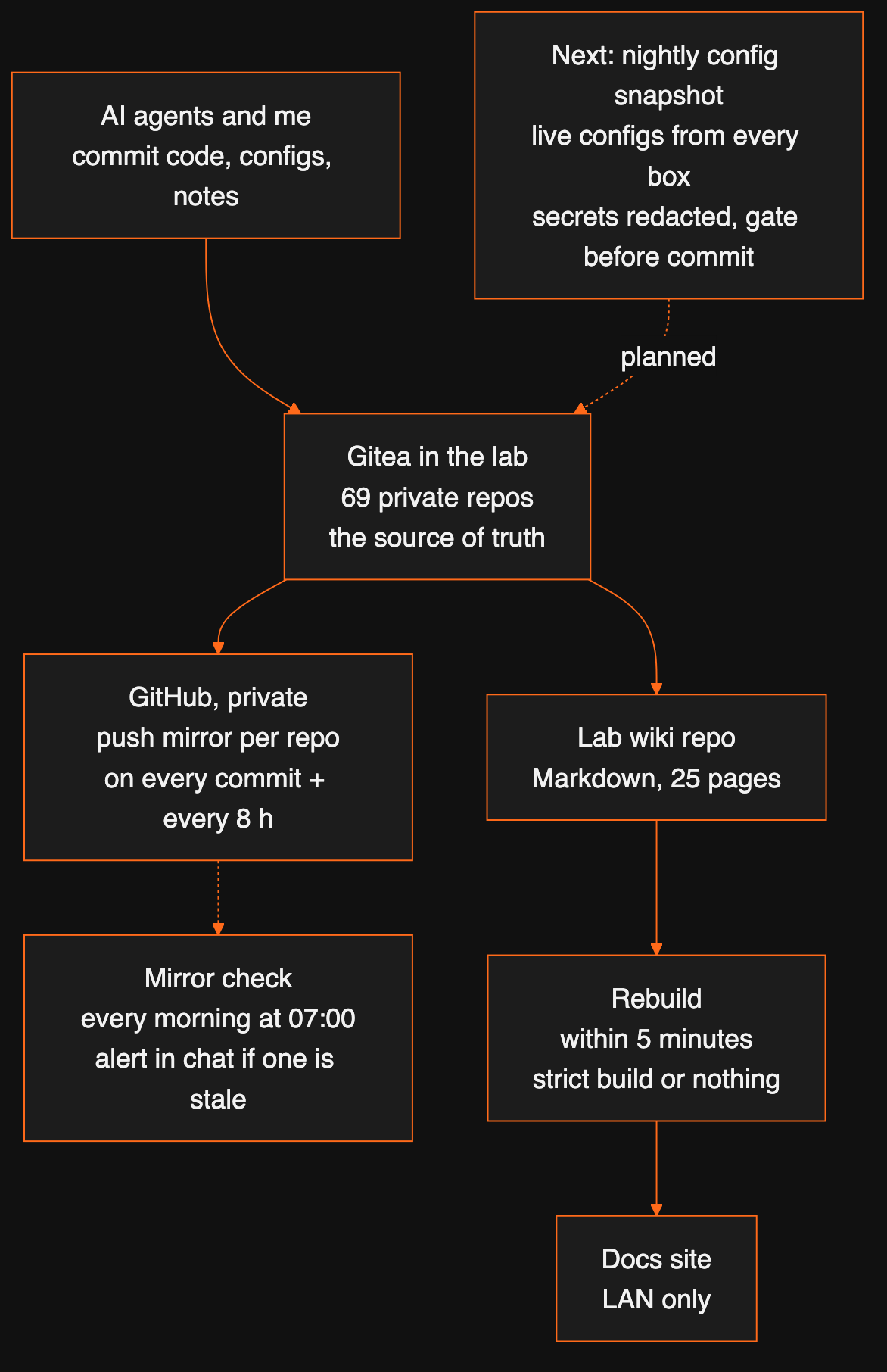
Gitea first, GitHub as the backup
Every project now lives on Gitea, a self-hosted Git server running in a container in the lab. That is the source of truth: every clone pushes there, every agent commits there. There are 69 repos today, from the SEO engine that publishes this blog to the scripts that run the cluster.
Every active Gitea repo has a push mirror to a private repo on GitHub. Gitea pushes to it after every commit and again every eight hours. The rule that keeps this simple: nothing is ever written on GitHub. No commits, no merged pull requests, no bots. The mirror overwrites GitHub with whatever is in the lab, so GitHub is a backup copy and nothing else. Local clones keep a github remote for fetching only, with pushing disabled.
| Gitea (in the lab) | GitHub (private) | |
|---|---|---|
| Role | Source of truth | Off-site backup copy |
| Who writes | People and AI agents | Only the mirror |
| Works without internet | Yes | No |
| Updated | On every push | After every commit, plus every 8 hours |

A mirror that quietly stops syncing is worse than none, because you only find out when you need it. So a small script runs every morning at 07:00. It lists every repo on Gitea, checks that each has a mirror, that the last sync had no error and that it ran in the last 24 hours, and posts to our #alerts channel in Zulip if anything is off. This morning’s run: 69 repos, 0 problems.
A wiki that rebuilds itself
The lab wiki is a MkDocs site with the Material theme: 25 pages, about 18,000 words, written in plain Markdown and stored as one more repo on Gitea. It covers the network and DNS, the Proxmox cluster, high availability and replication, backups, the NAS, every service, monitoring and alerts, and the house rules.
Nobody runs a build by hand. A timer on the docs container checks the Gitea repo every five minutes. When there is a new commit, it pulls it, runs mkdocs build --strict and swaps the new site in. Strict mode matters: a broken internal link or a bad config fails the build, and the old site stays up rather than a broken one going live.
new commit on Gitea
  → pull (checked every 5 minutes)
  → mkdocs build --strict
  → publish the new site, or keep the old one if the build fails
Beyond the reference pages, two parts earn their keep: the runbooks (what to do after a power cut, how to restore from backup, how to add a DNS record, how to test failover) and the incident log: one entry per problem, always in the same three lines, what happened, the cause and the fix. The log already has 16 entries since early October, from a DNS cache that remembered a wrong answer for an hour to a network cable that dropped to 100 Mbps during a nightly backup.
Written by an agent, with rules
The first version of the wiki was written by an AI agent: the Claude Code session that runs our infrastructure. It drew on its own running plan, the IP plan and live checks against each system. It updates the pages as it changes things. Four rules keep that honest:
- Names, never IP addresses. Every host and service is written by its DNS name. The IP plan page is the only exception.
- No secrets. Pages name the vault entry that holds a password, never the password.
- Mark what wasn’t checked. Anything not confirmed against the live system carries (to verify), so a guess never reads like a fact.
- The strict build must pass before anything is pushed.
The nightly snapshot: configs that lived only on the boxes
The wiki explains how things work. It doesn’t hold the exact settings. Many of those existed only on the machine that uses them: the cluster’s storage and replication settings, the router’s DNS and firewall config, the model servers on the GPU box, the smart-home automations, the timers and units we wrote ourselves. If a box died, that detail died with it.
So every night at 04:20 a script on the workstation, which has the SSH keys, collects them. For each machine it fetches a fixed allowlist of files, nothing else. It deletes anything binary or larger than 2 MB, takes the secrets out and commits the result to its own repo on Gitea, which is mirrored to GitHub like the rest. If nothing changed, there is no commit. Runtime state, like which guest is running where, is left out on purpose, so the history shows only real configuration changes. The first snapshot, on 25 October, held about 220 files.
Taking the secrets out is done in two passes:
- Leave out and redact. Files that hold keys (Wi-Fi and VPN configs) are never fetched. In every other file, the value of any setting whose name says password, secret, token or key becomes
<redacted>, and well-known token shapes (API keys, bearer tokens, private-key blocks, URLs with a password in them) are masked wherever they appear. The setting names stay, so the config still reads clearly. - The gate. A final scan looks for anything that still looks like a secret. If it finds one, it prints the file and nothing is committed that night.
| Step | What happens |
|---|---|
| 04:20 | Fetch an allowlist of files from each machine over SSH |
| Clean | Drop binaries, backups and anything over 2 MB |
| Redact | Replace secret values, mask token shapes, keep the names |
| Gate | Scan again; any match stops the run, nothing committed |
| Commit | Only if something changed, then push to Gitea, mirrored to GitHub |
The useful side effect: git log now answers “what changed on the router last week?” in seconds, and a rebuilt machine can be compared line by line against how it was the night before it broke.
Inventory pages that write themselves
The same nightly job also rewrites the wiki’s inventory section from the live systems: the guests and nodes from the Proxmox API, DHCP reservations and DNS records from the router, and the LLM routes from the model gateway. These are the pages that go stale first when they are written by hand, so now nobody writes them. Pages for the containers, the Kubernetes cluster and the NAS come next. The same idea as everything above: the documentation follows the systems, not the other way round. The NAS build is where the backups behind all of this end up.
Words used in this post
| Term | Meaning |
|---|---|
| Gitea | A self-hosted Git server, like a private GitHub you run yourself. |
| Push mirror | A setting that makes one Git server push every change to a copy on another. |
| MkDocs (Material) | A tool that turns a folder of Markdown files into a searchable website. |
| Strict build | A build that fails on any warning, such as a broken link, instead of publishing anyway. |
| Runbook | Step-by-step instructions for a known situation, like a power cut. |
| Redaction | Replacing secret values with a placeholder before a file is stored. |
| Allowlist | A fixed list of what may be collected. Anything not on it is ignored. |
The same method, applied to your systems
Most small businesses we talk to have the same gap: the setup works, but the knowledge of how it works lives with one person or one machine. The pattern here, one source of truth, an automatic off-site copy that is checked daily, and documentation rebuilt from what is actually running, fits a small office as well as a home lab. If you want to sketch it for your own setup, a free 30-minute call is enough.
FAQ
Why host Git yourself if you already have GitHub?
So the lab never depends on an outside service to work. Every repo’s main copy lives on Gitea inside the lab, which keeps working when the internet is down. GitHub holds a private mirror of each repo as an off-site backup.
How does a Gitea push mirror to GitHub work?
Gitea pushes each repo to a matching private GitHub repo after each commit, and again every eight hours as a safety net. The mirror overwrites GitHub, so nothing is ever committed there directly.
How do you know the mirrors are still working?
A small script runs every morning at 07:00. It lists every repo on Gitea, checks that each one has a push mirror, that the last sync succeeded and that it happened in the last 24 hours, and posts an alert to our chat if any fails.
How do you keep secrets out of config backups?
The nightly snapshot copies only an allowlist of files, leaves out the files that hold keys (Wi-Fi and VPN configs), replaces the value of any setting whose name says password, token or key, and masks known token shapes anywhere. Then a final check scans everything again and refuses to commit if anything still looks like a secret.
What tool do you use for the wiki?
MkDocs with the Material theme. Pages are plain Markdown in a git repo, diagrams are Mermaid, and the site is rebuilt with a strict build, so a broken link or a missing page stops the update instead of publishing it.
Who writes the documentation?
Mostly an AI agent. The Claude Code session that runs our Proxmox infrastructure wrote the first version from its own running plan, the IP plan and checks against the live systems, and updates it as it changes things.
Want this working in your business?
D3X Solutions LABS builds AI agents and automation that pay back fast. Set up a free 30-minute call and we will map your first win together.
Get in touch







