

Google Photos has one of the best business models ever invented. Step one: store everybody’s memories for free. Step two: wait ten years. Step three: send a polite email explaining that your memories are now 97% full, and offer a monthly plan to keep the baby photos where they are.
Our library was 565 GB. The free allowance is 15 GB, and it is shared with Gmail and Google Drive, so every 4K video of the cat was quietly eating the space for our email. The 100 GB plan doesn’t come close. The next plan up is 2 TB, which Google now sells as Google AI Plus: €9.99 a month for storage, plus an AI assistant nobody in this house asked for. That’s about €120 a year, every year, rising with every video recorded at full resolution.
We already had a NAS with 34.6 TB of disk sitting in the corner, running everything else in the lab. So we did the obvious thing and moved the photos home. The app we chose is Immich, an open-source, self-hosted Google Photos clone that is, frankly, a bit too good at being a clone. This is how the move went, including the parts where Google’s export format tried to ruin our week.
| What moved | Number |
|---|---|
| Photos | 58,039 |
| Videos | 4,118 |
| Library size | 565 GB (464 GB of it video, 101 GB photos) |
| New Google Takeout | 219.1 GB in 22 zip files |
| Older archive folder | 496 GB, 85,273 files (with a 242 GB Takeout from 2022 inside it) |
| Phone photos uploaded on switch-over morning | About 7,900 in an hour and a half |
| Monthly bill for the photos now | €0 to Google |
Fun fact from that table: 4,118 videos take up 82% of the space. The other 58,039 items are photos, and they fit in 101 GB. If you ever wondered why your Google storage bar jumps, it’s not the photos. It’s the three-minute video of a birthday cake with the camera pointing at the floor.
The setup: boring hardware, sensible layers
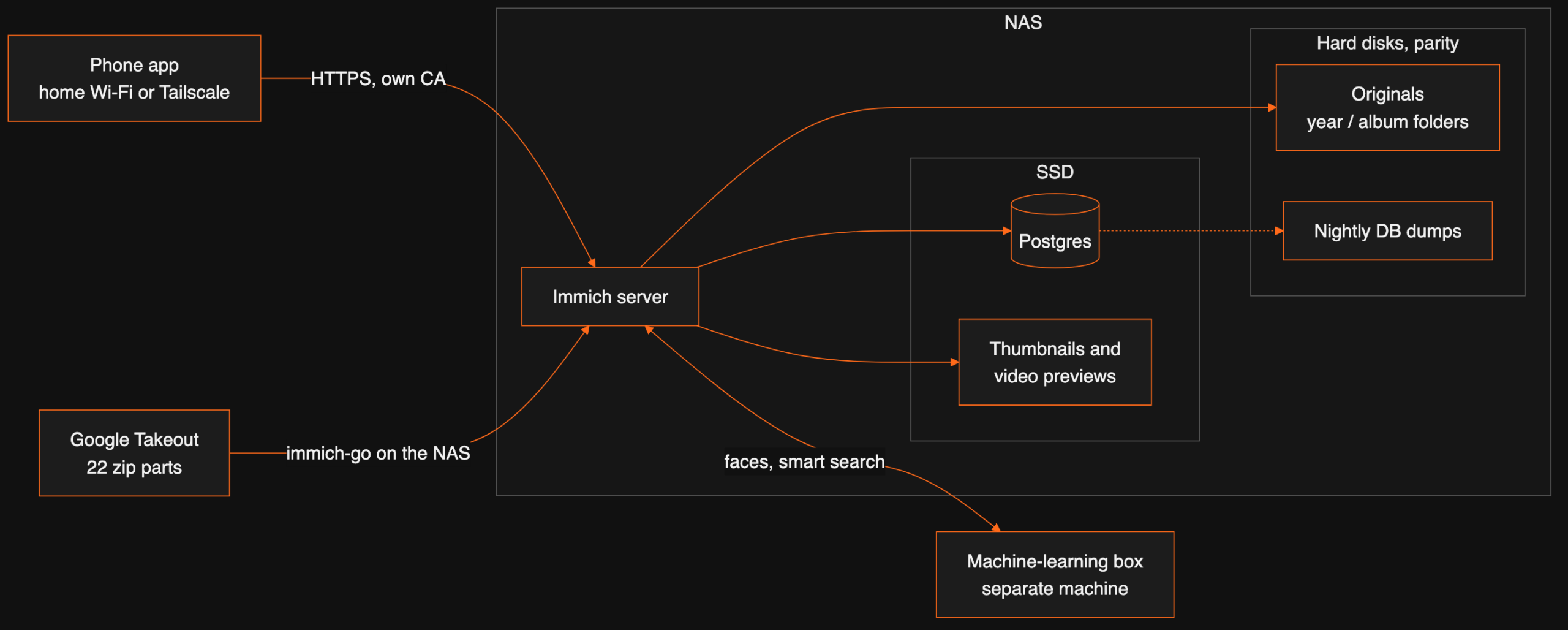
Immich runs as a Docker Compose stack on the NAS (Unraid). It has four parts: the server, a Postgres database, a Redis-style cache, and a machine-learning service for faces and search. Where each part lives matters more than which box it runs on:
| Part | Where it lives | Why |
|---|---|---|
| Original photos and videos | Parity-protected hard disks | The irreplaceable bit. Big, slow, safe |
| Postgres database | NAS SSD, a direct pool path | Postgres on Unraid’s merged user share would crawl or corrupt |
| Thumbnails and video previews | NAS SSD | Scrolling the timeline reads thousands of these; they can be rebuilt |
| Machine learning (faces, smart search) | A separate machine-learning box on the LAN | The NAS has 8 GB of RAM; Immich asks for 6 GB as a minimum, and loading the face and search models locally would not fit |
| Nightly database dumps | Next to the photos on the hard disks | Albums, faces and edits live in the database, not in the files |
The machine-learning part has a small joke built in. We run it on our dedicated AI box, the most powerful machine in the house, and it runs there on the CPU. Immich’s CUDA image only exists for x86, and the AI box is ARM. So the GPU idles while the processor recognises faces. It’s still faster than the NAS would be, and Immich doesn’t care: you give it a URL for the ML service, plus a fallback, and it tries them in order.
One rule we copied straight from the Immich docs: the server and the ML container must run the same version. We pin IMMICH_VERSION in both places and upgrade them together, reading the release notes, because the NAS’s “update available” badge for Compose stacks is decorative at best.
# .env on the NAS (secrets come from the password vault, never typed in)
IMMICH_VERSION=v3.3.3
UPLOAD_LOCATION=/mnt/user/<photos-share>/library
THUMB_LOCATION=/mnt/<ssd-pool>/appdata/immich/thumbs
ENCODED_VIDEO_LOCATION=/mnt/<ssd-pool>/appdata/immich/encoded-video
DB_DATA_LOCATION=/mnt/<ssd-pool>/appdata/immich/postgres
BACKUP_LOCATION=/mnt/user/<photos-share>/backups/immich-db
Google Takeout: a free export with a few traps
Google will give you all your photos back. It’s free, and to be fair, it works. It also arrives as 22 zip files of about 10 GB each, with download links that expire after seven days, so the whole thing feels a bit like a hostage exchange with a deadline. We requested it on 30 September, split the download into two batches, and had it on the NAS before the links died. The whole import, from download to the last album fix, ran from 5 to 14 October, scheduled around another big copy job on the same disks.
Then the format. Google doesn’t keep the date and location you see in the app inside the photo file. It puts them in a separate JSON “sidecar” file next to each photo. Those sidecars can end up in a different zip part from the photo they belong to. Unzip the parts one by one, import them into anything, and a good share of your library lands on the day you exported it. Your 2009 holiday becomes a very busy Tuesday in October 2026.
The fix is immich-go, a command-line uploader that understands Takeout. You give it every zip part in one run, and it matches each photo with its sidecar across the parts without unzipping anything:
immich-go upload from-google-photos \
  --server=http://localhost:2283 --api-key=<import-only key> \
  --sync-albums=false --dry-run \
  /mnt/user/<photos-share>/import/google-takeout/takeout-*.zip
Three choices in that command are deliberate:
- It runs on the NAS itself. Running it from a laptop would pull 219 GB over the network just to push it straight back again. On the NAS, the files are local and the upload goes to localhost.
--dry-runfirst. It reports what it would upload, skip and merge, and changes nothing. We read that report before the real run.--sync-albums=false. Google creates albums on your behalf: trips it guessed, people it recognised, every screenshot you ever took. We imported without them, then added back only the albums a human made on purpose, in a second pass.
Duplicates sort themselves out, mostly. Immich refuses a second upload of a byte-identical file (it compares SHA-1 checksums), so photos that existed both in the Takeout and in our older archive folder were skipped automatically. The catch is Google’s “storage saver” quality: those copies were re-encoded, so they don’t match the originals byte for byte. For those, Immich has a duplicate review screen that compares the pictures themselves, and we keep the larger file.
How much work did deduplication do? Merging the Takeout parts with the older 2022 Takeout found about 48,000 duplicates before a single file was uploaded. In the final Takeout pass, 43,700 of 52,600 assets were already on the server, and 6,400 were the same photo sitting in several Google albums at once. The archive folder pass then added only about 400 new items out of 9,500. Without checksums, we would have had three copies of most of our lives.
Folders that outlive the app
Our biggest worry with any photo app is the day we stop using it. Google Photos stores your library as a database you can only leave through Takeout. Immich can write the originals into a folder structure you choose, with its storage template:
{{y}}/{{#if album}}{{album}}{{else}}{{y}}-{{MM}} {{MMMM}}{{/if}}/{{filename}}A photo in an album lands in 2023/<album name>/. Everything else goes to 2025/2025-03 March/. The year always comes from the capture date, so a New Year’s Eve album splits across two year folders, which is annoying for exactly one album a year and keeps every other folder honest. If Immich vanished tomorrow, the library would still be a perfectly normal tree of folders that any file browser can open.
One order-of-operations detail: immich-go adds photos to albums after it uploads them, so they first land in the month folders. Running the Storage Template Migration job once after the import moves them into their album folders.
Switch-over day
The phone side was almost disappointing. Install the Immich app, enter the server address, sign in, pick which phone albums to back up (camera and screenshots), turn backup on. On the morning of 26 October, about 7,900 photos and videos went up in an hour and a half on home Wi-Fi, and then Google Photos backup was switched off on the phone.
Two settings worth a thought:
- Away from home. Immich isn’t on the public internet. The phone reaches it on home Wi-Fi, or anywhere else with Tailscale switched on. We turned off video backup over mobile data: a few 4K clips over Tailscale is a quick way to find out how big your data plan really is.
- Our own certificate. The server uses HTTPS with a certificate from our own small certificate authority, so the phone needs that root certificate installed once, in the security settings. Nothing to renew with a public provider.
And then the obvious question: “Can I delete the photos from my phone now?” Yes. Immich has a Free up space button that removes only what the server has confirmed. Which brings us to the uncomfortable part.
What €9.99 a month was actually buying
Google wasn’t really charging for storage. Disks are cheap. It was charging for somebody else’s building: a copy of your photos that survives your phone falling into the sea, a dead disk, a burst pipe or a ransomware note. When you self-host, that job comes back to you. Here’s what protects our library today, and what doesn’t:
| Risk | Covered? | By what |
|---|---|---|
| One hard disk dies | Yes | Unraid parity: the array rebuilds onto a new disk |
| Immich database corrupted | Yes | Nightly database dump, 14 kept, stored with the photos |
| App gone, abandoned or broken by an upgrade | Yes | Originals in plain year and album folders |
| Deleted by mistake, ransomware | Not on its own | Needs versioned backups somewhere else |
| Fire, flood, theft of the NAS | Not on its own | Needs a copy outside the house |
The fix for the last two rows is known and cheap: a nightly encrypted backup to an old disk in a USB dock, and the same backup to a small European storage box for a few euros a month. That’s a choice every self-hoster makes for themselves. Just make it consciously, and before you press Free up space on the phone. Google’s real product was never the storage bar. It was the copy you never had to think about.
And Google Drive?
Here’s the part of the bill people miss. Google’s storage is one bucket, shared by Photos, Drive and Gmail. You don’t pay for “photo storage”; you pay because the bucket is full, and for most people it’s full of photos and videos. Documents and email grow by megabytes a week. A phone camera grows by gigabytes. Take the photo library out of the bucket and Drive and Gmail usually fit back in the free 15 GB, or the €1.99 plan at worst. No dramatic Drive migration required: we simply stopped paying a photo tax dressed up as a Drive upgrade.
The bill, honestly
| Google (2 TB plan) | Immich at home | |
|---|---|---|
| Monthly | €9.99 (or ~€100 a year, paid annually) | €0 in subscriptions |
| Hardware | Theirs | A NAS we already ran for the rest of the lab, plus a few GB of its RAM and SSD |
| Off-site copy | Included, invisible | Your job: a few euros a month if you want one |
| Search, faces, map, sharing | Yes | Yes |
| Price rises and plan renames | Their decision | Our decision |
| Time spent | None | One night to set up, about ten days of import |
If you don’t already run a NAS, the maths is different: buying disks only to escape €10 a month takes a few years to pay back. If you do, Immich is one of the easiest wins in self-hosting. The stack itself went up in one night. The Takeout took longer than everything else together, mostly because Google packs a decade of photos into 22 zip files and a seven-day timer.
Is it worth it? Every month that the “storage almost full” email doesn’t arrive says yes.
FAQ
How much does Google Photos storage cost in Ireland?
Every Google account gets 15 GB free, shared between Photos, Drive and Gmail. On Google’s Irish plans page the next steps are 100 GB for €1.99 a month, then 2 TB (now sold as Google AI Plus) for €9.99 a month, then 5 TB (Google AI Pro) for €21.99 a month. Annual billing saves up to 16%. A 565 GB library needs the 2 TB plan.
Can Immich really replace Google Photos?
For us, yes: phone backup in the background, a timeline, albums, face grouping, search by what is in the picture (“dog on a beach”), map view and sharing. What it doesn’t give you for free is a copy in someone else’s building. That part is your job now.
How do you import a Google Takeout into Immich?
With immich-go, run on the machine that holds the files: immich-go upload from-google-photos with all the Takeout zip parts in one run. It reads dates, GPS and albums from Google’s JSON sidecar files, so you don’t need to unzip anything or fix metadata by hand.
Do I need a GPU for Immich?
No. Face detection and smart search run fine on a CPU; a big first import just takes longer. We run the machine learning container on a separate, stronger box and point Immich at it, so the NAS doesn’t have to do it.
Can I reach my self-hosted photos away from home?
Yes. We use Tailscale: with it switched on, the phone app reaches Immich from anywhere, and nothing in the house is opened to the internet.
Want this working in your business?
D3X Solutions LABS builds AI agents and automation that pay back fast. Set up a free 30-minute call and we will map your first win together.
Get in touch







