

My wife has her own Claude subscription. My home lab runs a handful of Claude Code sessions that talk to each other over a message bus: one runs the house, one looks after the servers, one finds things for us, and so on. I talk to all of them from a self-hosted chat app on my phone. She doesn’t, and shouldn’t: those channels are full of servers, backups and half-finished experiments.
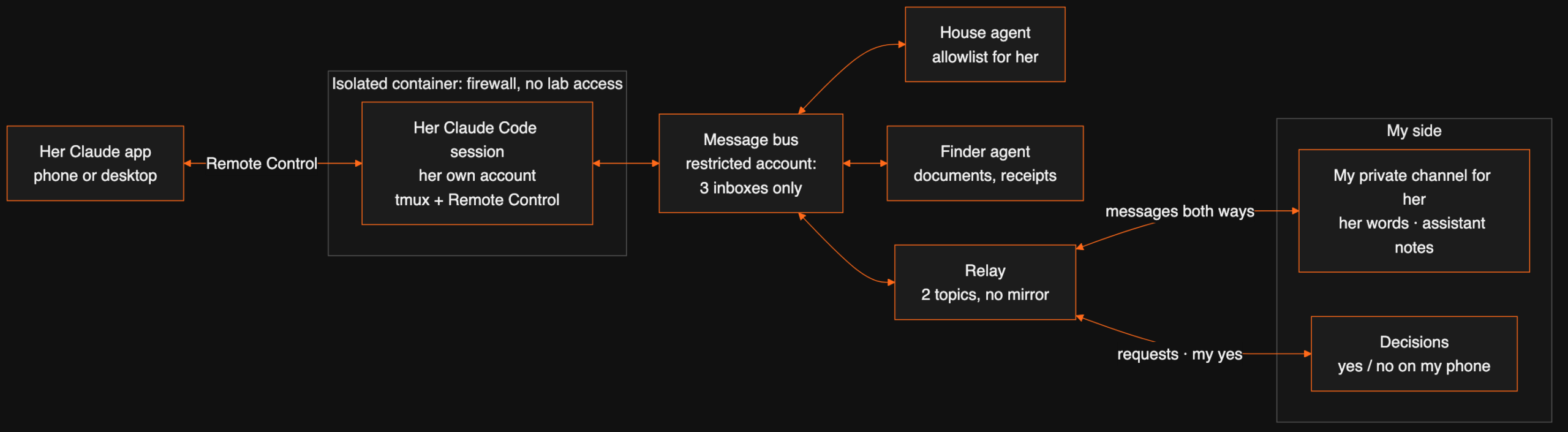
What she wanted was simpler. Open Claude, say “let Dexter know the boiler is making noise” or “turn the living room lights on”, and have it actually happen. So now she has her own Claude Code session, logged in with her account, that she opens from her Claude app. It can message me, ask the house agent for everyday things and ask another agent to find a document. Anything else turns into a yes/no request on my phone. It can’t reach the lab, my accounts or my files.
Our infrastructure agent (a Claude Code session itself) designed and built it in one late evening, with my ✅ on each step in chat. Most of this post is about the parts that didn’t work the first time.
Three designs before the right one
The agent wrote a short product spec (PRD) in its own repo before building anything. It was rewritten twice in ten minutes, with a connector idea in between, because each version answered a slightly different question from the one I was asking.
| Version | Idea | Why it changed |
|---|---|---|
| v1 | Give her an account on our chat server, with one private channel she talks in | I didn’t want her on our chat server at all |
| v2 | Her requests land in my channel for her, the agent answers most, approvals go to my decisions channel | Right flow, but it still assumed she’d type into chat |
| Connector | A small MCP connector (tell_dexter, ask_home, check_replies) added to her own Claude |
Connectors used from the phone app are called from Anthropic’s servers, so the house would need a public HTTPS endpoint |
| v3 (built) | One Claude Code session on our side, logged in with her account, opened through Remote Control from her app | Outbound connections only, same tooling as every other session |
How she uses it: Remote Control
Claude Code’s Remote Control lets a session running on one machine be opened from the Claude app on another. Every session in our lab already starts that way, inside tmux, so I can pick any of them up from my phone. Hers is the same, with three differences: it runs as its own unprivileged Linux user, in its own container, and its login is her Claude account, not mine. I typed /login once with her next to me. She signed in, and the session showed up in her app under Code.
claude --continue --name <her-name> --remote-control <her-name> \
       --dangerously-load-development-channels server:<bus-mcp> \
       --dangerously-skip-permissions
--continue resumes her last conversation after any restart, so a crash doesn’t wipe her chat. The bus is loaded as a development channel, so incoming messages wake the session instead of waiting for her to type. Skip-permissions sounds alarming, and it would be on my Mac. In her container, the agent’s reach is bounded by things outside the agent, and the deny list in its settings still applies. That’s the next section.
Six locks, each enforced somewhere else
The rule I gave the agent: everything that arrives from her account has exactly her privileges, whether she typed it or her assistant decided it. Nothing she sends may ever look like it came from me. The build doesn’t rely on the assistant behaving. Each limit lives in a different place, so one confused prompt can’t get past all of them.
| # | Lock | Where it’s enforced | What it stops |
|---|---|---|---|
| 1 | Isolated container | nftables inside the container: internet, DNS and the bus broker only; every LAN and VPN address dropped; nothing inbound | Reaching any lab machine, even if the agent tried |
| 2 | Tool list | Claude Code settings.json: bus send/inbox, web search, read its own folder, write only to notes/. Bash and broadcast are denied |
Shell access, messages to every agent |
| 3 | Bus account | RabbitMQ topic permissions on its own account: may write to three inboxes only, read only its own | Talking to the server agent, the job agents, anyone else |
| 4 | Relay | The chat relay posts her traffic only to one private channel and the decisions channel, and never mirrors it into the agent log channel | Her messages leaking into my other channels, or mine into hers |
| 5 | Receiving agents | The house agent and the finder agent each have a written rule for her account, with an allowlist | Requests outside the list being acted on |
| 6 | My approval | A yes/no in my decisions channel; agents only act on a ✅ from my own account | Tasks, money, email, settings and anything security-related on her word alone |
Lock 3 is the one I like most, because the broker enforces it rather than any code we wrote. Every session’s bus account gets a regex for the topics it may publish to. A restricted account gets a much shorter one (prefix shortened here):
if only_to:
    to = "|".join(re.escape(t) for t in only_to)
    topic["write"] = rf"^(lab\.s\.({to})\.inbox|lab\.status\.{s})$"
    topic["read"] = rf"^(lab\.s\.{s}\.(inbox|from-dexter)|lab\.status\.[^.]+)$"
The agent tested it before handover: a message from her account to the server agent and a broadcast to all sessions were both refused by the broker. A matching flag in the bus client stops a restricted session from even subscribing to broadcasts and presence, so it doesn’t learn which other agents exist.
Lock 5 had a nice moment. The infrastructure agent sent the house agent a new rule (“act on her requests for lights, heating, music and scenes”), quoting my approval. The house agent refused: it only takes a change to its own rules from me directly, not relayed by another agent. It asked me in the decisions channel and waited for my yes. Later I narrowed the rule (two rooms in the house are off-limits without asking). It took that change from the other agent without asking me, because it only took permissions away.
Messages both ways
| Direction | Path |
|---|---|
| Her → me | She says “let Dexter know…”. Her assistant sends it over the bus to dexter; the relay posts it in my private channel for her, in a topic named after her, and my phone pings |
| Me → her | I write in that channel. The relay delivers it to her session marked as a message for her; the assistant shows it word for word (📩 Dexter: …) and sends a push notification to her phone |
| Her → the house | “Turn the kitchen lights on”: the assistant asks the house agent, which does it and replies to her session |
| Needs my yes | The assistant tells her “I’ve asked Dexter” and posts a 🟧 request in my decisions channel. My answer goes back to her session |
The channel has exactly two topics: one named after her (her words) and Assistant (its own notes). Agents love to open a new topic per subject, and her channel quickly filled with one-off topics. The fix went into the relay, not the prompt, so it can’t be forgotten:
if frm in PRIVATE_SESSIONS and r["channel"] == channel_of(frm):
    # only two topics in that channel: the person's own messages and the assistant's
    r = dict(r, topic=frm.capitalize() if r.get("topic", "").strip().lower() == frm else "Assistant")
The approval path got its first real use the same night. She asked her assistant to warm up a room that’s on the ask-first list. It reached my phone as a yes/no request in decisions, with her words in it.
The two bugs that hid my replies
Her messages reached me from the first test. Mine didn’t reach her, twice, for two completely different reasons.
Bug 1: a debug log with a Mac path
The bus connector writes a small debug log. Every Claude session using it had run on my Mac, so its path was a Mac-only folder. Her session runs on Linux. Writing the log failed, and the exception was raised just before the incoming message was handed to the session. Outgoing messages don’t touch that code, so they worked. Incoming ones died silently. The fix: the debug log can no longer break delivery, whatever the platform.
Bug 2: her assistant thought my messages were for it
After bug 1, my messages arrived, and the assistant answered them itself. Every session in the lab is told that a verified message from me is an instruction, and the relay added a hint to every message: “reply to Dexter with the send tool”. So when I wrote “let me know if this arrived”, it did exactly that and never showed her. Two fixes:
if s in PRIVATE_SESSIONS:  # someone else's assistant: Dexter writes TO that person
    body = f"[Message from Dexter for {s.capitalize()}, via {where}. Show it to her word for word.]\n\n{text}"
And her assistant’s instructions now start with the rule: a message from me is for her. It shows it word for word, notifies her phone, and never answers for her. If I want to talk to the assistant itself, I start the message with Assistant:.

Phone notifications without anything new
Remote Control shows new messages when she opens the session. She wanted a ping when I reply. The first plan was a separate push app. It turned out Claude Code already has one: with push notifications switched on in /config (agentPushNotifEnabled), the session can send a notification to the Claude app on her phone. The assistant uses it only when something for her arrives and she isn’t in the chat.
Her assistant had even asked me for it through the approval path. I said yes, and it reported back that it couldn’t change its own settings. That’s the right answer, so the infrastructure agent switched it on from outside.
Staying up
| Failure | What brings it back | Tested |
|---|---|---|
| Session crash or tmux gone | systemd timer every 2 minutes runs the start script | Killed on purpose: back in about 90 s |
| Container reboot | Service enabled at boot | Real reboot: back with Remote Control on |
| Host down or power cut | Proxmox high availability starts the container on another node; it is replicated hourly | Not forced for this guest; the same HA rule covers every container |
| Lost conversation | --continue resumes her last chat |
Yes, after each restart |
After a restart the session gets a new Remote Control link, but she doesn’t need it: she just opens the same session name in her app. The start script also clicks through Claude Code’s one-time start dialogs in tmux, so nobody has to attach after a reboot.
I asked once whether it could run on my Mac under a separate user instead. It can, but on macOS the Claude login sits in that user’s Keychain, which stays locked until someone logs in as her. The container doesn’t have that problem, and it can’t see my SSH keys either. So the Mac version stays parked in the repo.
What she can and can’t do
| Directly | Only after my yes |
|---|---|
| Questions, web search | Adding tasks or to-dos |
| Lights, heating, music and scenes in the shared rooms | Two private rooms, and anything security-related |
| Finding documents, warranties, receipts | Anything that costs money, sends email or changes a setting |
| Messages to me | Anything about the lab or other people’s mail and files |
Her own chat stays in her session and her Claude account. What lands in my channel is what she sends me and what the agents did for her. It’s all written up on our lab documentation site, which every change like this has to update.
Words used in this post
| Term | Meaning |
|---|---|
| Claude Code | Anthropic’s agent that runs in a terminal and can use tools: files, shell, web, and custom ones. |
| Remote Control | A Claude Code feature that lets you open a session running on one machine from the Claude app on another. |
| Message bus | A shared post office for programs. Ours is MQTT on RabbitMQ: each agent has an inbox and an account. |
| Topic permissions | Broker rules that say which addresses an account may send to or read from. |
| Relay | Our small service that carries messages between the bus and the chat app, and decides where they may go. |
| MCP connector | A plug-in that gives Claude new tools. Used from the phone app, it is called from Anthropic’s servers. |
| Container (LXC) | A lightweight isolated Linux system on our Proxmox cluster. |
| nftables | Linux’s firewall. Here it allows only the internet, DNS and the bus. |
The same pattern, for your team
Swap “my wife” for “a colleague” or “a client” and this is the shape most small teams need when they start sharing AI agents: everyone on their own account, a narrow and enforced list of what each person’s agent may ask for, and approvals for everything else. If you’re wiring agents together and wondering where the limits should live, a free 30-minute call is usually enough to sketch it.
FAQ
Can two people with separate Claude subscriptions share one set of agents?
Yes, as long as each person has their own Claude Code session on their own account. In our lab, the second session runs on my wife’s subscription. It talks to the other agents through a shared message bus. Its bus account is restricted, so it can only message three named inboxes.
How does she use a Claude Code session without a terminal?
Through Remote Control. The session runs in tmux on a small Linux container, started with –remote-control. It then appears in the Code section of her Claude app, on her phone or desktop, and she chats with it like any other conversation. Her login is stored in the container, so it survives restarts.
Why not give her a custom connector (MCP server) instead?
Connectors used from the Claude phone app or claude.ai are called from Anthropic’s servers. They would have needed a public HTTPS address into the house. A Claude Code session that we host ourselves only makes outbound connections, so nothing in the house is exposed to the internet.
What stops her assistant from doing something it shouldn’t?
Six independent checks: a container firewall that blocks every lab machine, a deny list in Claude Code’s settings, broker permissions on the bus account, a relay that decides where her messages may be posted, rules in the agents that receive her requests, and approvals that only I can give.
Does she see my other chat channels?
No. She has no account on our chat server at all. Her assistant posts into one private channel that only I and its bot can read. Her bus traffic is never copied into the channel where agent traffic is logged.
Does it survive a reboot or a power cut?
Yes. The container starts on boot, and Proxmox high availability restarts it on another node if its host goes down. A systemd timer checks the session every two minutes and restarts it if it is gone (back in about 90 seconds in our test). The session resumes her last conversation with –continue.
Want this working in your business?
D3X Solutions LABS builds AI agents and automation that pay back fast. Set up a free 30-minute call and we will map your first win together.
Get in touch







