
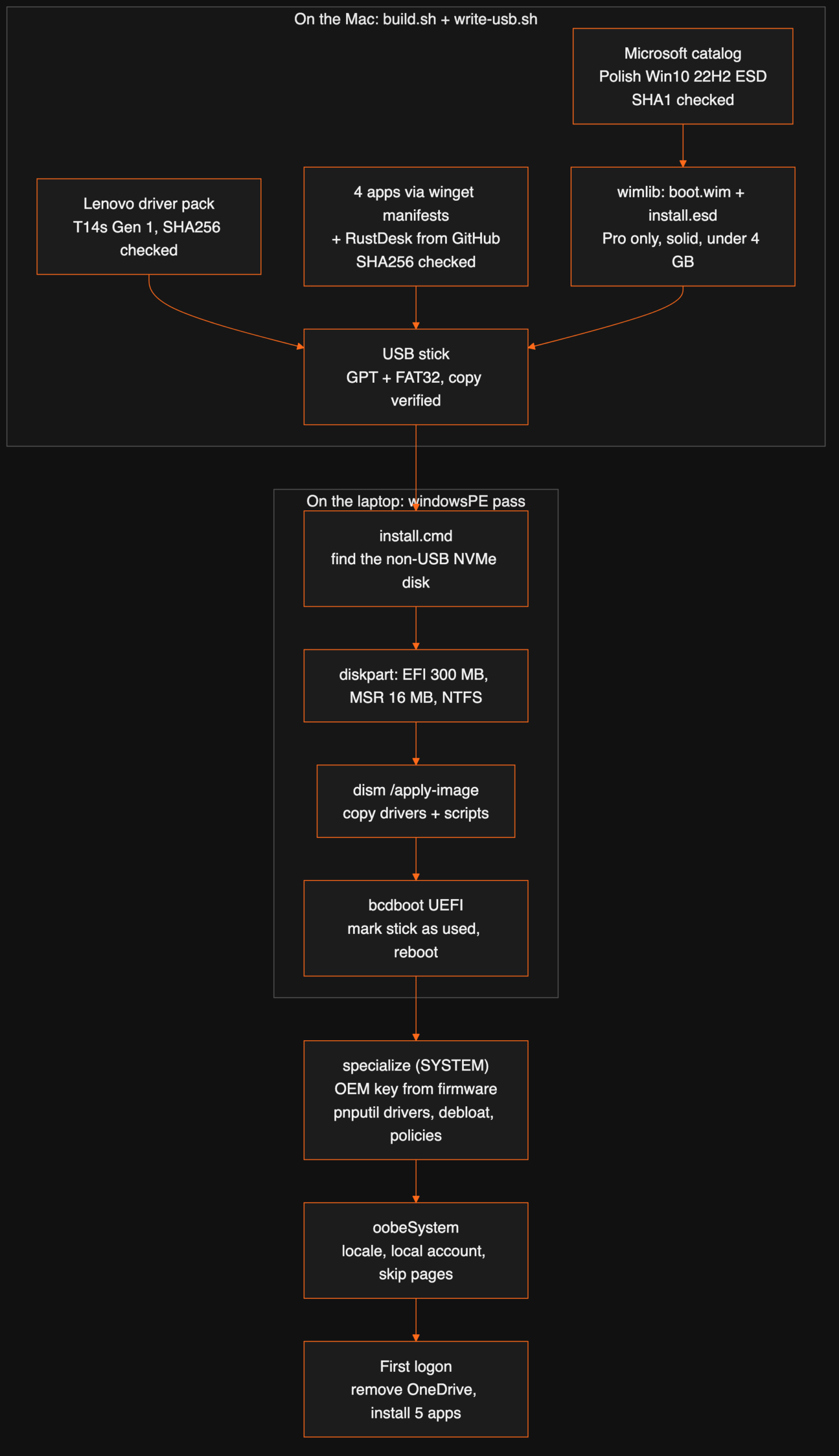
A family member needed a clean laptop: an old ThinkPad T14s Gen 1, wiped and rebuilt with Polish Windows 10 Pro, proper drivers, none of the preinstalled clutter, and the handful of apps they actually use. The usual way is an evening of clicking through Setup, hunting for drivers and uninstalling junk. We wanted a USB stick instead: plug it in, press F12, walk away, and come back to a finished machine.
It was built on a Mac, by an AI agent (our general-purpose Claude Code session), from sources that are all downloaded fresh and checksum-checked. It worked, but not first time. This post has the whole build, what every script does, and every way it broke on the way, because those parts are where the next person will lose their evening.
What goes on the stick
| Part | Source | Check |
|---|---|---|
| Windows 10 Pro 22H2, Polish, x64 | Microsoft’s Media Creation Tool product catalog (the ESD the tool itself downloads) | SHA1 from the catalog |
| Drivers | Lenovo’s Windows 10 22H2 driver pack for the T14s Gen 1 (types 20T0/20T1) | SHA256 pinned in the script |
| Firefox (Polish), GIMP, Inkscape, Krita | Latest x64 installer URLs from the microsoft/winget-pkgs manifests | SHA256 from each manifest |
| RustDesk (remote help) | Latest GitHub release MSI | SHA256 from the release, when GitHub publishes one |
| Answer file and scripts | Our own: autounattend.xml, a WinPE install script, two PowerShell scripts | XML checked with xmllint |
The finished media is 7.9 GB: setup files, a 3.5 GB image, 173 driver INF files and the five installers. It needs a stick of 16 GB or more.
Building Windows media on macOS without an ISO
Microsoft publishes a small catalog, products.cab, that lists every ESD file the Media Creation Tool can download: language, architecture, edition, URL and SHA1. The build script downloads the catalog, picks the pl-pl / x64 / Professional entry, downloads that ESD and checks its hash.
An ESD from this catalog is not an install image. It is a container with several images inside. Image 1 holds the setup media files, image 2 is Windows PE, image 3 is Windows Setup, and the editions follow. wimlib takes it apart:
wimlib-imagex apply  "$esd" 1 media/                                    # setup files
wimlib-imagex export "$esd" 2 media/sources/boot.wim --compress=LZX          # Windows PE
wimlib-imagex export "$esd" 3 media/sources/boot.wim --compress=LZX --boot   # Setup, bootable
wimlib-imagex export "$esd" $pro media/sources/install.esd --solid          # Windows 10 Pro only
The last line matters most. The stick is FAT32, so UEFI firmware boots it with no special write mode, and FAT32 caps a single file at 4 GB. Keeping only the Pro image and exporting it with solid LZMS compression gives a 3.5 GB install.esd. The script also checks the whole media folder for any file over 4,095 MB before it finishes.
Drivers and apps, resolved and checked
Lenovo ships the T14s driver pack as one self-extracting Inno Setup installer. On the Mac, innoextract unpacks it without running it. Its files land in a folder literally called code$GetExtractPath$, named after the installer’s own variable, so the script copies that folder’s contents. They go under sources\$OEM$\$1\Drivers. Anything in $OEM$\$1 ends up on the new C: drive, and anything in $OEM$\$$ ends up in C:\Windows.
The apps come from the same manifests that winget uses. For each app, a small Python script lists the versions in microsoft/winget-pkgs, takes the newest, reads its installer manifest and picks the x64 installer. It prefers a machine-wide install and an MSI where one exists. It downloads that installer, checks it against the manifest’s SHA256 and writes the silent-install switches into an apps.json. RustDesk isn’t in winget-pkgs, so its MSI comes from the latest GitHub release.
| App | Version | Installer | Silent switches |
|---|---|---|---|
| Firefox (Polish) | 157.0.1 | EXE (Nullsoft) | /S /PreventRebootRequired=true |
| GIMP 3 | 3.2.6 | EXE (Inno) | /VERYSILENT /SUPPRESSMSGBOXES /NORESTART /ALLUSERS |
| Inkscape | 1.4.4 | MSI | /qn /norestart |
| Krita | 5.3.4.1 | EXE (Nullsoft) | /S |
| RustDesk | 1.5.0 | MSI | /qn /norestart |
Writing the stick, safely
Erasing the wrong disk is the one mistake a script like this must never make. So write-usb.sh refuses unless the target is an external or removable disk, is a whole disk rather than a partition, and is large enough. It shows the disk’s name and size and waits for you to type ERASE. Only then does it run diskutil eraseDisk FAT32 WIN10PL GPT, copy the media and compare the copy with the source.
Two macOS habits got in the way. First, Spotlight started indexing the stick mid-copy, and the copy slowed to 1 to 3 MB/s, so the script now turns indexing off for the volume first. Second, macOS writes a hidden AppleDouble file (._name) next to every file on a FAT32 volume. Most of those are harmless clutter. ._something.inf files are not: Windows’ driver installer would try to install them. The script removes them with dot_clean and a find -delete, and only then compares the copy.
The answer file, stage by stage
Windows Setup looks for autounattend.xml in the root of the stick. The file answers Setup’s questions in stages, which Microsoft calls configuration passes:
| Pass | When it runs | What ours does |
|---|---|---|
| windowsPE | In the installer, before Windows is on the disk | Polish setup language and Polish (Programmers) keyboard; runs our own install script; the edition key |
| specialize | First boot of the new Windows, as SYSTEM, before any user exists | Computer name, Warsaw time zone (Central European Standard Time); runs specialize.ps1 |
| oobeSystem | The first-start pages | Polish locale; skips the licence, OEM, Microsoft-account, Wi-Fi and privacy pages; creates a local administrator; logs it in automatically once; runs firstlogon.ps1 |
The edition comes from Microsoft’s public generic Windows 10 Pro install key. It tells Setup which edition to install and activates nothing. Leaving the key empty doesn’t work: Setup stops with “cannot read the product key from the file”. That was the first failure.
The disk problem: Setup thought the stick was the boot disk
The second boot got further, then failed with “can’t create or find the system partition”. The answer file told Setup to wipe and partition disk 0. On this laptop, disk 0 wasn’t always the internal SSD. Even after the script picked the right disk, Setup’s own disk logic still took the USB stick for the boot disk: its log said “Couldn’t find info for boot disk [1]”, and Setup then wouldn’t install or write the boot loader.
The fix was to take the install away from Setup altogether. A RunSynchronous command in the windowsPE pass looks through the drive letters for the stick’s install.cmd and runs it. That script does the whole install with standard Windows PE tools:
- Find the internal disk. For disks 0 to 7 it runs
diskpart‘sdetail disk. It skips any disk whose type is USB and takes the first one that is NVMe, SATA, RAID or SAS. If it finds none, it stops. - Partition it.
clean,convert gpt, a 300 MB FAT32 EFI partition, a 16 MB Microsoft Reserved partition and one NTFS partition across the rest. - Apply Windows.
dism /apply-image /imagefile:<stick>\sources\install.esd /index:1 /applydir:W:\, about 15 to 25 minutes on this laptop. - Copy what Setup would have copied. The
$OEM$folders (drivers and scripts) go to W:\ and W:\Windows. The answer file goes toW:\Windows\Panther\unattend.xml, so the later passes still run. - Make it bootable.
bcdboot W:\Windows /s S: /f UEFI /l pl-pl. - Mark the stick as used and reboot with
wpeutil reboot.
find /i ": USB" X:\dd%%N.out >nul || (
  for %%T in (NVMe SATA RAID SAS) do find /i ": %%T" X:\dd%%N.out >nul && set target=%%N
)
The first run of that script failed in under a second with error 9009, “command not found”. The script used findstr, and Windows PE doesn’t include it. The older find is there, so the script now uses that. The next run went through cleanly: the internal 476 GB NVMe disk was found as disk 0, the image went on, 1,952 driver and script files were copied, and the log ends with “Boot files successfully created”.
Two safety catches sit around this. If the script fails, it copies Setup’s logs onto the stick, opens a window showing its own log, and leaves you at Setup’s normal disk screen. And when it succeeds, it writes installed.txt to the stick. If the laptop later boots from the same stick, the script sees the marker and refuses to wipe anything. A separate patch-usb.sh refreshes a stick’s scripts from the Mac and clears or sets that marker.
First boot: drivers, activation and debloat
specialize.ps1 runs as SYSTEM before any user profile exists, which makes it the right place for machine-wide changes:
- Activation. It reads the laptop’s own Windows key from the firmware (the
OA3xOriginalProductKeyproperty ofSoftwareLicensingService, from the MSDM ACPI table) and installs it withslmgr /ipk. Windows activates with it once it is online. - Drivers.
pnputil /add-driver C:\Drivers\*.inf /subdirs /installinstalls all 173 Lenovo INF files, then deletes the folder. - Bloat. It removes 26 provisioned Store apps (Xbox, Solitaire, Skype, Office hub, Your Phone, Maps, Mail and Calendar, 3D Viewer and so on) for all future users. Store, Photos, Calculator, Camera and Snip & Sketch stay.
- Privacy and noise. Group-policy registry values switch off consumer features and suggested apps, telemetry (
AllowTelemetry 0), the advertising ID, Cortana, web results in Start search, News and Interests, the activity history and OneDrive sync. The DiagTrack and dmwappushservice services are disabled. - Defaults for every new profile. It loads the default user’s registry hive and switches off the Content Delivery Manager suggestions and OneDrive’s auto-start. It shows file extensions, opens Explorer on This PC and hides the Task View and People buttons, then unloads the hive.
The last hang, and the apps
After the reboot the laptop stopped once more, on a first-start page that checks the connection to Microsoft (“Sprawdzanie połączenia z firmą Microsoft”). There was no network at that point, and the page just waited. The standard “hide this page” settings didn’t cover it.
That night it was cleared by hand. skip.cmd on the stick creates the local administrator, queues the app installer to run at the next logon, sets the three registry values that tell Windows setup is finished (OOBEInProgress, SetupType and SystemSetupInProgress, all 0) and restarts. The apps then went on from the stick with one command, powershell -ep bypass D:\…\apps.ps1, which reads apps.json and runs each installer silently. All five reported exit code 0.

The answer file now also carries SkipMachineOOBE and SkipUserOOBE. Microsoft lists them as deprecated, but Windows 10 still honours them, and they skip every first-start page, including that online check, while the local account and first-logon commands still apply. The spare stick has that fix. It will be proven on the next laptop, not this one.
In the normal path, firstlogon.ps1 does the app step on its own: it uninstalls OneDrive, installs the five apps from apps.json and deletes the installers. One PowerShell 5.1 quirk to know if you copy it: piping ConvertFrom-Json output on a JSON array straight into ForEach-Object hands you the whole array as one object. The script stores it in a variable first and loops over that.
Everything that broke, in order
| # | Symptom | Cause | Fix |
|---|---|---|---|
| 1 | The stick wouldn’t respond; macOS hung reading it | A flaky USB 2.0 hub | Another hub; the stick then ran at USB 3 speed |
| 2 | Copy slowed to 1–3 MB/s | Spotlight indexing the stick | mdutil -i off before copying |
| 3 | Hidden ._*.inf files on the stick |
macOS AppleDouble files on FAT32 | dot_clean plus delete, before the copy check |
| 4 | “Cannot read the product key from the file” | Empty product key in the answer file | Microsoft’s generic Pro install key; OEM key from firmware later |
| 5 | “Can’t create or find the system partition” | Setup treated the USB stick as the boot disk | Our own WinPE install script: diskpart, dism, bcdboot |
| 6 | Install script failed with error 9009 | No findstr in Windows PE |
Use find |
| 7 | First start stuck on the Microsoft online check | No network during first start | skip.cmd that night; SkipMachineOOBE in the answer file now |
| 8 | Stick couldn’t be patched again | macOS won’t remount an ejected stick until it is re-plugged | patch-usb.sh only unmounts now |
Words used in this post
| Term | Meaning |
|---|---|
| ESD / WIM | Microsoft’s compressed image formats. One file can hold several Windows images. |
| Windows PE | The small Windows that runs the installer before the real Windows is on the disk. |
| autounattend.xml | The answer file that answers Windows Setup’s questions for you. |
| Configuration pass | A stage of Windows Setup: windowsPE, specialize, oobeSystem and so on. |
| OOBE | Out-of-box experience: the first-start pages Windows shows before you reach the desktop. |
| $OEM$ folders | Folders on the install media that Setup copies onto the new system. |
| MSDM | The firmware table where a laptop sold with Windows stores its own product key. |
| winget-pkgs | Microsoft’s public repository of app manifests, with installer URLs and SHA256 hashes. |
| Debloat | Removing preinstalled apps and switching off ads, suggestions and telemetry. |
The same method, applied to your systems
This is one laptop, but the pattern is how small offices should be setting up machines: one stick, or one network boot, that wipes and rebuilds a PC the same way every time, with drivers and apps checked against their publishers. If you set up laptops by hand for new starters or after a failure, a free 30-minute call is enough to sketch what an unattended build would look like for your fleet.
FAQ
Can you make a Windows 10 install USB on a Mac?
Yes. You don’t need the Media Creation Tool. Download the ESD that tool would fetch straight from Microsoft’s product catalog, then use wimlib (from Homebrew) to unpack the setup files, build boot.wim and export install.esd. Copy it all to a FAT32 GPT stick, which UEFI firmware boots directly.
Why not just write the ISO to the stick with dd?
A UEFI PC boots a plain FAT32 stick without any special write mode. A FAT32 stick is also easy to edit later: you can swap the answer file or a script with a normal file copy. Its limit is 4 GB per file, so the Windows image must be smaller than that. We keep only the Pro edition and export it with solid compression, which gives a 3.5 GB install.esd.
What is autounattend.xml?
It is the answer file Windows Setup looks for on removable media. It answers every question Setup would ask, grouped by stage: windowsPE (language, disk, image), specialize (computer name, time zone, first scripts) and oobeSystem (account, privacy pages, first logon).
Why did Windows Setup refuse to install to the laptop’s SSD?
On this ThinkPad, Setup’s own disk logic took the USB stick for the boot disk. It failed with “can’t create or find the system partition”, then wouldn’t install or write the boot loader. So our script does the install itself in the windowsPE stage: it finds the internal NVMe disk with diskpart, partitions it, applies the image with dism and writes the boot loader with bcdboot.
How does Windows activate if the answer file has no real product key?
The answer file holds Microsoft’s public generic Pro install key, which only selects the edition and activates nothing. Laptops sold with Windows carry their own key in the firmware (the MSDM ACPI table). A script reads it with SoftwareLicensingService, installs it with slmgr /ipk, and Windows activates once it is online.
Can the stick wipe the laptop again by accident?
No. After a successful install, the script writes a marker file on the stick. If the laptop boots from that stick again, the script sees the marker, refuses to touch any disk and leaves you at Setup’s normal disk screen.
Want this working in your business?
D3X Solutions LABS builds AI agents and automation that pay back fast. Set up a free 30-minute call and we will map your first win together.
Get in touch







